
Your AI Operating System for
Everyday Life.
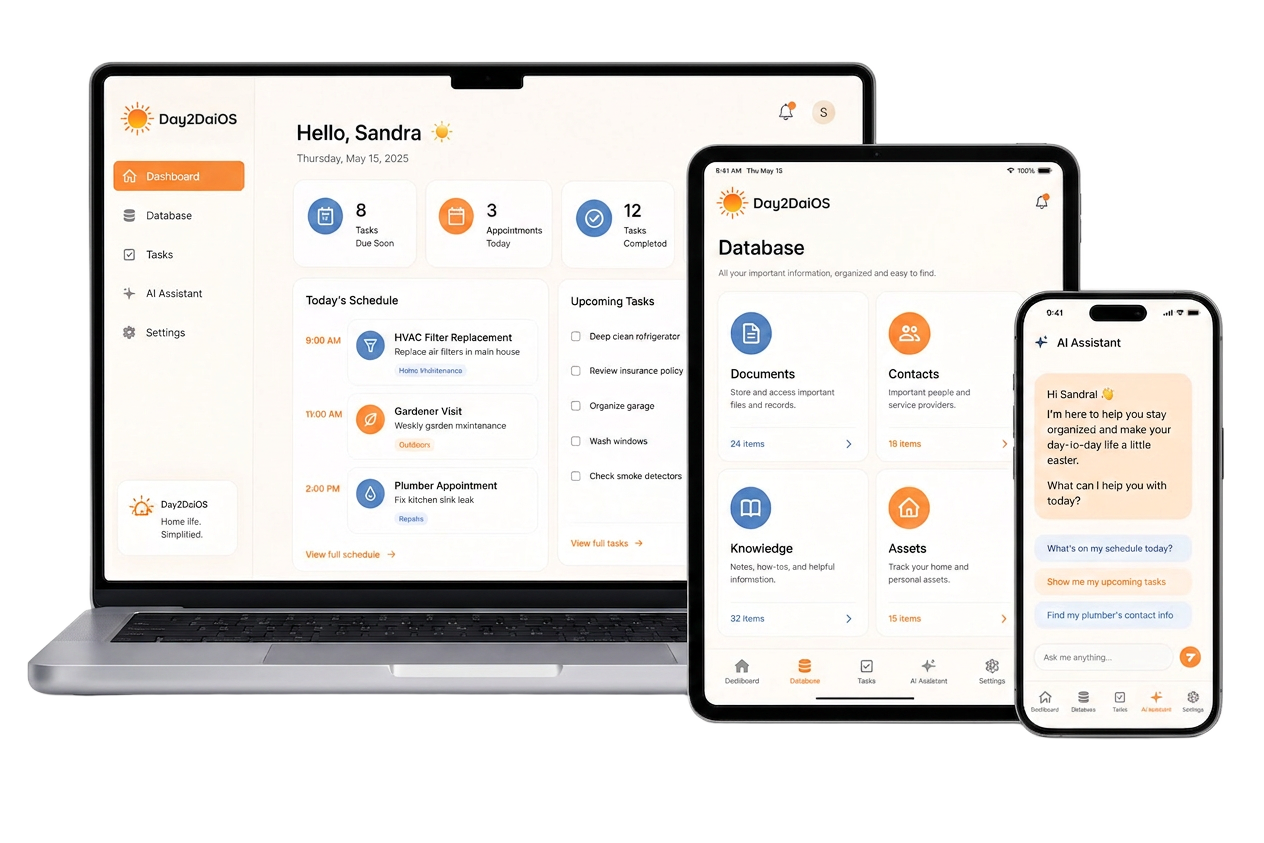
Day2DaiOS brings together information, responsibilities, reminders, documents, and everything that matters — so you can focus on what matters most.
Workspace
 Dashboard
 Database
 Tasks
Tasks AI Assistant
 SettingsHello, SandraToday
Today's Schedule
AI Suggestions
Home insurance expires in 30 days. Want a reminder set?
45
Docs
20
People
42
Notes
16
Assets
Lighten the mental load.
DAY2DAIOS was created to help you organize information, coordinate responsibilities, and manage the moving parts of everyday life — so less gets forgotten.
Features
One Connected Operating System. One AI Assistant, Complete Control.
AI Assistant
Built into every page.
Extract
Pulls model numbers, dates, totals, and warranty terms from your uploads.
Connect
Links a receipt to its appliance, a contact to the property they service.
Remind
Surfaces what's overdue, what's coming, what you might be forgetting.
Database
Documents
Manuals, invoices, warranties, contracts, receipts, and more.
Contacts
Family, vendors, teams, service providers, contractors.
Knowledge
Instructions, notes, procedures, how-tos, recipes, references.
Assets
Appliances, properties, vehicles, devices, equipment, and more.
Coordination & collaboration
Workspaces
Separate spaces for home, work, rentals, teams, projects.
Access & Roles
Control who can view, edit, share, invite, or manage.
Tasks
Recurring responsibilities, reminders, delegation, schedules, and more.
Real people. Real ways to use DAY2DAIOS.

Organize a household
Keep manuals, warranties, reminders, chores, contacts, and important info in one shared space.

Manage properties
Track maintenance, vendors, leases, invoices, inspections, and documents across multiple properties.

Run operations
Organize procedures, SOPs, equipment, tasks, and recurring responsibilities for smooth operations.

Teams & organizations
Coordinate projects, share knowledge, delegate tasks, and keep everyone aligned and informed.

Families & caregivers
Share information, assign responsibilities, and make sure nothing gets forgotten.
Integrations
Works with what you already use.
Honest status — what's live today, what's coming next.
Google Calendar
Subscribe to your tasks as a live calendar feed.
Apple Calendar
Same .ics feed — works in Apple Calendar.
Outlook
Same .ics feed — works in Outlook too.
Google Sign-in
One-tap account creation and login.
Gmail
Forward receipts and invoices straight to your vault.
Google Drive
Import existing folders of documents.
Dropbox
Bring your existing Dropbox storage along.
iCloud Drive
Pull files in from iCloud.
Google, Gmail, Google Calendar, Google Drive, Outlook, Dropbox, Apple, and iCloud are trademarks of their respective owners. Logos shown to indicate compatibility — not partnership or endorsement.
MEMBERSHIP